


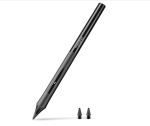
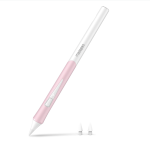

Metapen Pen D1 Bluetooth Stylus for iPad (2018-2026)
৳ 3,550
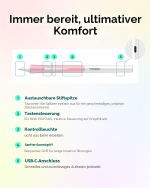
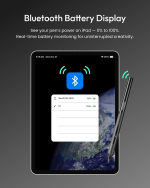
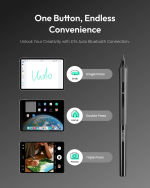
- Bluetooth Shortcuts: Connect via Bluetooth to activate handy shortcut functions like screenshots or returning home.
- Ergonomic Comfort Grip: Contoured design specifically engineered to minimize hand fatigue during long writing sessions.
- Advanced Palm Rejection: Rest your hand naturally on the screen without triggering accidental marks.
- Pixel Precision & Zero Lag: High-sensitivity smart chip ensures smooth, immediate response for writing and sketching.
- Tilt Sensitivity: Adjust line thickness dynamically by angling the tip for shading and artistic work.
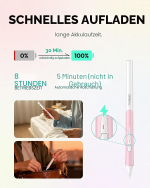
- USB-C Fast Charging: Quick and convenient power-ups with reliable battery performance.
- Auto Sleep Power Saving: Automatically turns off after periods of inactivity to preserve battery life.
- Wide iPad Compatibility: Designed to support compatible iPad models released from 2018 through 2026.
🎁 Special Offers
🚚 Free Delivery
৳2,000 টাকার বেশি অর্ডারে Free Delivery
💰 Shopping Bonus
৳5,000 টাকার বেশি অর্ডারে ৳300 ডিসকাউন্ট
iPad Accessories / Bluetooth Stylus Pens
Metapen Pen D1 Bluetooth Stylus for iPad (2018-2026) – Palm Rejection, Customizable Side Button & Comfortable Grip
The Metapen Pen D1 Bluetooth Stylus for iPad is designed for comfortable digital writing, everyday productivity, and creative work on compatible iPad models. Featuring an ergonomic grip, palm rejection, Bluetooth connectivity, and a programmable side button, the Metapen D1 combines practical writing features with app-powered customization to help you create a personalized tablet experience.Whether you are taking handwritten notes, annotating PDFs, sketching ideas, or working in digital notebooks, this stylus offers useful controls in a comfortable design. Through the companion Metapen app, supported functions include customizing the side-button action, adjusting tip signal settings, and accessing a pen-finding feature. It is a practical accessory for students, professionals, and digital creators who want more control over their iPad workflow.Key Features of Metapen Pen D1
Comfortable Ergonomic Grip
The distinctive grip is designed to provide a comfortable hold during extended writing, note-taking, and drawing sessions.
Palm Rejection
Rest your hand naturally on a compatible iPad screen while writing or drawing with the stylus.
Programmable Side Button
Customize a supported side-button action through the Metapen app to suit your preferred workflow.
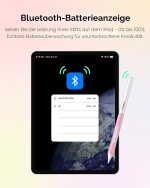
Bluetooth Connectivity
Connect to a compatible iPad to access supported app-based controls and additional stylus functions.
Find Your Pen
Explore the pen-finding feature in the Metapen app. Availability and operation depend on the connection and app setup.
Adjustable Tip Signal
Use the companion app's tip-signal controls to fine-tune the writing setup when supported.
Metapen Pen D1 Specifications
| Specification | Details |
|---|---|
| Brand | Metapen |
| Product Name | Metapen Pen D1 Bluetooth Stylus |
| Product Type | Active stylus pen for compatible iPad devices |
| Compatibility | Selected iPad models; verify the exact model before purchase |
| Connectivity | Bluetooth for supported connected features |
| Grip Design | Distinctive comfort-focused grip |
| Palm Rejection | Supported |
| Side Button | Programmable action through the Metapen app |
| App Features | Supported button customization, tip-signal adjustment, and pen-finding function |
| Charging | Confirm charging method and battery specifications with the current product listing or manual |
| Pressure Sensitivity | Not confirmed in the official product information referenced here |
| Wireless Charging | Not confirmed in the official product information referenced here |
Comfortable Design for Everyday Writing
Ergonomic Grip for Longer Sessions
The Metapen D1 features a distinctive grip designed around comfort and control. A comfortable hold can make a difference when you are taking extensive handwritten notes, marking up documents, or working through detailed sketches. Its practical design makes it suitable for everyday use at school, in the office, or at home.Palm Rejection for More Natural Hand Positioning
Palm rejection helps prevent unwanted hand contact from interfering with writing or drawing while the stylus is in use. This allows you to position your hand more naturally on a compatible iPad display, particularly during longer digital writing sessions. Performance depends on device compatibility and correct setup.Customize Your Workflow with the Side Button
The programmable side button lets you configure a supported action through the Metapen app. Depending on the available controls and app compatibility, this can help streamline common tasks and reduce the need to reach for on-screen controls. Available actions may differ by application and software version.Metapen App Integration
The companion app provides access to supported D1 settings, including side-button customization, tip-signal controls, and a pen-finding feature. These options help you tailor the stylus to your preferences. Some functions require Bluetooth connectivity and suitable app permissions or configuration.Pen-Finding Assistance
If you misplace your stylus, the Metapen app includes a pen-finding feature intended to help locate it. Availability and behavior depend on the connection state and app setup, so it should be treated as a helpful convenience rather than a guaranteed location-tracking service.iPad Compatibility Guide
The Metapen Pen D1 is designed for selected iPad models. Although the retailer's product title references iPads from 2018 to 2026, compatibility should be checked against the manufacturer's model-specific list rather than assumed for every iPad released during that period.- Open your iPad's Settings app.
- Go to General and select About.
- Check the exact iPad model name and generation.
- Compare your device with the official Metapen D1 compatibility information before ordering.
- Confirm that your iPad supports the functions you intend to use, including Bluetooth-based app controls.
Ideal Uses for Metapen Pen D1
Students
Take handwritten notes, annotate study materials, and organize digital notebooks on a compatible iPad.
Office Professionals
Review documents, write meeting notes, and use supported shortcut actions to streamline daily work.
Digital Creators
Sketch ideas and work with compatible creative applications using a comfortable stylus grip.
Everyday Productivity
Write lists, plan projects, annotate reading materials, and personalize supported stylus controls.
Frequently Asked Questions
1. What is the Metapen Pen D1?
The Metapen D1 is a stylus designed for compatible iPads. Its official feature set includes a comfort-focused grip, palm rejection, a programmable side button, and app-powered controls.
2. Does the Metapen D1 support palm rejection?
Yes. Palm rejection is supported to help reduce unwanted touch input while writing or drawing with the stylus on a compatible iPad.
3. Can I customize the side button?
Yes. The Metapen app allows you to program a supported side-button action. The available options depend on the app and current software support.
4. Does the D1 connect through Bluetooth?
Yes. Bluetooth is used for supported connected features and app-based customization. Follow Metapen's setup instructions for pairing and configuring the stylus.
5. Can the Metapen app help me find a misplaced pen?
The app includes a pen-finding feature. Its availability and behavior depend on the stylus connection and app setup, so it should not be considered a guaranteed tracking system.
6. Is the Metapen D1 compatible with all iPads released from 2018 to 2026?
Not necessarily. The retailer's title gives that year range, but the manufacturer specifies compatibility by device model. Check the official compatibility list for your exact iPad before purchasing.
7. Does the D1 support pressure sensitivity?
Pressure sensitivity is not confirmed in the official D1 product information referenced here. If you need pressure-sensitive brush control for digital art, verify this feature with Metapen before ordering.
8. What charging method and battery life does it have?
The official product information referenced here does not establish the charging method or battery specifications. Check the current product listing or user manual for confirmed details.
9. Is the Metapen D1 an Apple Pencil?
No. It is a third-party stylus made by Metapen for compatible iPads. Its supported features differ from Apple Pencil models, so check the feature list carefully if you need a specific function.
10. What should I check before buying?
Verify your exact iPad model, confirm support for the Metapen D1, and review charging, battery, and drawing-feature details in the latest manufacturer documentation. This helps ensure the stylus matches your needs.
Why Choose Metapen Pen D1 for iPad?
The Metapen Pen D1 Bluetooth Stylus combines a comfort-focused grip, palm rejection, Bluetooth-enabled app controls, and a programmable side button in one practical accessory for compatible iPads. Its customizable controls and pen-finding feature make it worth considering for users who want a stylus tailored to their digital writing and productivity routine.Before purchasing, confirm the exact compatibility of your iPad and review the manufacturer's specifications for battery, charging, and advanced drawing features. Choosing a supported device helps you get the best experience from the Metapen D1.GadgetBeng
SMART GADGETS • TECHNOLOGY • ACCESSORIES
Explore practical tech accessories for everyday productivity, creativity, and convenience.
You May Also Like
More picks from this category


Reviews
Clear filtersThere are no reviews yet.