


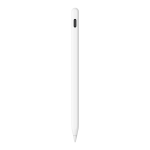
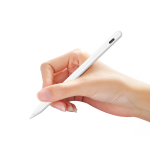
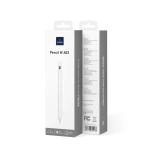
WiWU Tilt Palm Rejection Pencil for iPad with Replacement Nib Pencil W A03
৳ 2,500 Original price was: ৳ 2,500.৳ 2,190Current price is: ৳ 2,190.
- Designed for iPads released from 2018 onwards with advanced palm rejection technology
- Tilt sensitivity function for natural shading and precise drawing lines
- Lightweight ABS construction weighing only 7g for comfortable handling
- Built-in 90mAh battery with modern Type-C fast charging port
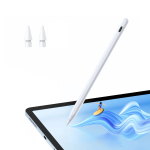
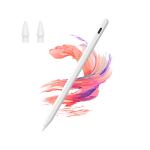
- Includes 2 replacement pen nibs for long-term durability and consistent performance
- Clean white finish optimized for digital art, note-taking, and daily navigation
🎁 Special Offers
🚚 Free Delivery
৳2,000 টাকার বেশি অর্ডারে Free Delivery
💰 Shopping Bonus
৳5,000 টাকার বেশি অর্ডারে ৳300 ডিসকাউন্ট
WiWU Tilt Palm Rejection Pencil for iPad with Replacement Nib Pencil W A03
The WiWU Pencil W A03 Tilt Palm Rejection Stylus Pen is designed for iPad users who want a convenient tool for digital note-taking, document annotation, sketching, and everyday writing. Its palm rejection technology allows you to rest your hand naturally on a compatible screen while using the stylus, helping reduce accidental touches during writing and drawing.Featuring tilt sensitivity, a lightweight ABS body, and a convenient USB Type-C charging port, the WiWU Pencil W A03 combines practical functionality with a compact design. It has a listed 90mAh battery and weighs approximately 7g according to the official product specifications. The package includes two replacement pen nibs, helping you maintain the stylus for continued everyday use.Key Features of WiWU Pencil W A03 Stylus Pen
✍️ Palm Rejection Technology
Rest your hand naturally on the compatible iPad screen while writing or drawing. Palm rejection helps prevent unintended screen inputs and makes longer writing sessions more comfortable.
🎨 Tilt Sensitivity
The tilt function responds to the angle of the stylus, helping you create natural-looking strokes and shading for sketching, illustration, and handwritten notes.
🔄 Two Replacement Nibs
The package includes two replacement pen nibs, giving you spare tips for continued use when the original nib becomes worn or needs replacing.
🔋 USB Type-C Charging
The USB Type-C charging port offers a convenient way to recharge the stylus. Use a suitable charging cable and follow the product instructions for safe charging.
🪶 Lightweight 7g Design
With a listed weight of approximately 7g, the Pencil W A03 is lightweight and easy to carry alongside your iPad for study, work, and everyday creative tasks.
📱 Designed for Compatible iPads
The official product page lists compatibility with iPads released after 2018. Confirm your exact iPad model and stylus support before purchasing to help ensure compatibility.
Natural Writing and Precise Digital Note-Taking
The WiWU Pencil W A03 is designed to make writing on a compatible iPad feel more convenient and controlled. Use it to take class notes, write meeting summaries, annotate PDFs, mark up documents, or record ideas without relying entirely on your fingertips.A stylus can provide more control than finger input when working with handwritten text, small interface elements, and detailed marks. The Pencil W A03 is a practical option for students, professionals, and everyday iPad users who regularly interact with digital documents.For the best experience, use the stylus with a compatible app and a supported iPad model. Writing smoothness and accuracy can vary depending on the device, application, screen condition, and the way the stylus is used.Writing tip: Keep the screen clean and check the condition of the nib periodically. A clean screen and a properly fitted tip can help provide a consistent writing experience.Palm Rejection for Comfortable Writing
Palm rejection is one of the key features of the WiWU Pencil W A03. When supported by the iPad and application, it helps distinguish stylus input from unwanted contact made by your resting hand.This feature is particularly useful when writing multiple lines of notes, annotating documents, or sketching for extended periods. You can position your hand more naturally on the screen instead of constantly adjusting your grip to avoid accidental touches.Palm rejection performance depends on compatibility between the stylus, iPad model, and software. Check the device requirements and application settings if accidental touch input occurs during use.For a more comfortable workflow, hold the stylus in a natural writing position and use a compatible note-taking or drawing application that supports the required input features.Tilt Sensitivity for Sketching and Shading
The WiWU Pencil W A03 features a tilt function intended to provide more natural control when drawing and sketching. By changing the angle of the stylus, you can work with supported brush effects and create shading that feels closer to using a traditional drawing tool.This functionality can be helpful for digital artists, students learning to draw, and users who like adding sketches or diagrams to their notes. It offers a useful creative option beyond basic tapping and writing.The result depends on the drawing application and its brush settings. Not every brush or app responds to tilt in the same way, so explore the available tools to find the settings that suit your work.Creative tip: Try different stylus angles and brush sizes in a compatible drawing app to discover how tilt-supported tools respond to your movements.USB-C Charging and 90mAh Battery
The WiWU Pencil W A03 is specified with a 90mAh battery and a USB Type-C charging port. This rechargeable design allows you to top up the stylus when needed rather than replacing disposable batteries.USB-C charging is convenient for everyday use, whether you keep the stylus with your tablet at home, carry it to class, or use it for work. Charging time and actual operating duration may vary with battery condition and usage.The official product page does not specify a guaranteed operating time or full charging duration. Some retailer listings provide additional estimates, but these should be confirmed with the seller for the exact version before relying on them.Battery tip: Use a suitable charging cable, avoid exposing the stylus to extreme temperatures, and follow the manufacturer's instructions for charging and storage.Lightweight ABS Design and Replacement Nibs
The Pencil W A03 uses an ABS body and has an official listed weight of approximately 7g. Its lightweight construction makes it convenient to keep in a tablet bag or carry alongside other study and work accessories.The stylus is designed for practical everyday use, from handwriting and document markup to casual sketching. Its simple form is easy to integrate into a digital workflow without adding much weight to your everyday carry.Two replacement nibs are included in the package. Keeping spare tips available is useful if a nib wears down or needs to be changed. Follow the manufacturer's guidance when replacing a tip, and avoid forcing or overtightening it.As with any stylus, protect the tip from unnecessary pressure and impacts, and store the pen safely when it is not in use.- For students: Take digital notes, annotate lecture slides, and mark up study materials on a compatible iPad.
- For professionals: Review documents, make handwritten comments, and add annotations to work files.
- For artists: Use tilt-supported tools for sketching, shading, and creative experimentation in compatible apps.
- For everyday iPad users: Navigate supported apps and interact with digital content using a pen-style input device.
- For frequent note-takers: Benefit from palm rejection and keep the included replacement nibs available for future use.
WiWU Pencil W A03 Stylus Pen Specifications
| Specification | Details |
|---|---|
| Brand | WiWU |
| Model | Pencil W A03 |
| Product Type | Stylus Pen for Compatible iPads |
| Body Material | ABS |
| Battery Capacity | 90mAh |
| Charging Port | USB Type-C |
| Product Weight | Approximately 7g, as listed by WiWU |
| Palm Rejection | Supported |
| Tilt Sensitivity | Supported |
| Replacement Nibs | 2 replacement pen nibs included |
| Compatibility | iPads released after 2018; confirm exact model compatibility |
| Colour | White |
| Battery Life | Not specified on the official product page; check seller details for estimates |
| Charging Time | Not specified on the official product page |
| Package Contents | 1 × WiWU Pencil W A03 Stylus Pen, 2 × Replacement Pen Nibs |
| Warranty | Check the current seller's warranty terms |
Specification note: The official WiWU product page lists the Pencil W A03 with an ABS body, 90mAh battery, 7g weight, USB Type-C charging, palm rejection, tilt sensitivity, and two replacement nibs. Operating time, charging duration, and warranty conditions may vary by seller or region and are not confirmed in the official specification list. Confirm the exact iPad model and package contents before purchase.
Who Should Choose the WiWU Pencil W A03?
Students
A useful option for digital handwriting, class notes, study materials, and document annotation on a compatible iPad.
Digital Artists
Tilt sensitivity can support shading and expressive strokes in compatible drawing applications.
Professionals
Use the stylus for reviewing files, annotating documents, and making handwritten comments during work.
Everyday iPad Users
Its lightweight design, USB-C charging, palm rejection, and replacement nibs make it a practical accessory for regular tablet use.
Frequently Asked Questions (FAQ)
1. What is the WiWU Pencil W A03?
The WiWU Pencil W A03 is a stylus pen designed for compatible iPads. It features palm rejection, tilt sensitivity, USB Type-C charging, and a lightweight ABS body for writing, drawing, and note-taking.
2. Does the WiWU Pencil W A03 support palm rejection?
Yes. Palm rejection is a listed feature. On a compatible iPad and supported app, it helps reduce unwanted screen input from your resting hand while writing or drawing.
3. Does this stylus support tilt sensitivity?
Yes. The Pencil W A03 has a tilt function intended to support natural shading and different stroke effects in compatible drawing applications.
4. Which iPads are compatible with the WiWU Pencil W A03?
WiWU lists compatibility with iPads released after 2018. Compatibility can depend on the exact iPad model, so check the device model number and confirm with the seller before ordering.
5. How do I charge the WiWU Pencil W A03?
The official specification lists a USB Type-C charging port. Use a suitable USB-C charging cable and follow the manufacturer's charging instructions for your specific version.
6. What is the battery capacity of the Pencil W A03?
The official WiWU product page lists a 90mAh battery. The official specification does not confirm a guaranteed operating time or full charging duration.
7. How much does the WiWU Pencil W A03 weigh?
WiWU lists the product weight as approximately 7g, making it a lightweight option to carry with a compatible iPad.
8. Are replacement nibs included in the package?
Yes. The official product page lists two replacement pen nibs in the package in addition to the stylus itself.
9. Can I use the Pencil W A03 for drawing and taking notes?
It is designed for writing, note-taking, sketching, and document annotation on compatible iPads. The available features and results depend on the app and device being used.
10. What comes in the WiWU Pencil W A03 package?
The official product page lists one WiWU Pencil W A03 stylus pen and two replacement pen nibs. Confirm any additional accessories and the applicable warranty with the seller.
Why Choose the WiWU Pencil W A03 Stylus Pen?
The WiWU Pencil W A03 Tilt Palm Rejection Stylus Pen combines palm rejection, tilt sensitivity, USB Type-C charging, a 90mAh battery, and a lightweight ABS body in a practical accessory for compatible iPad users. Its included replacement nibs add convenience for ongoing writing, drawing, and document work.Whether you are a student taking digital notes, a professional marking up documents, or a creative user sketching on a tablet, the Pencil W A03 offers useful everyday stylus functions. Before purchasing, verify that your iPad model is supported and check the seller's current warranty and charging details for the exact version.Explore Smart Accessories at GadgetBeng
Discover stylus pens, tablet accessories, and practical technology essentials at GadgetBeng. Compare device compatibility, palm rejection, tilt functionality, charging options, replacement nibs, and warranty details to find the right accessory for your everyday digital workflow.
You May Also Like
More picks from this category


Reviews
Clear filtersThere are no reviews yet.