


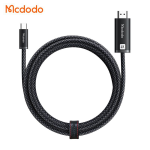
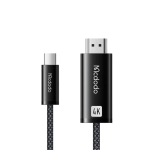
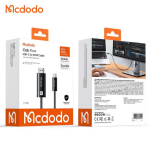
Mcdodo CA-7900 USB-C to HDMI 4K 60Hz Cable – 2M
৳ 1,650
- 4K @ 60Hz Ultra HD: Supports high-resolution video output at a smooth 60Hz refresh rate for crystal-clear displays and gaming.
- Plug-and-Play Simplicity: Direct Type-C to HDMI connection requires no external drivers, software installations, or power adapters.
- Bi-Directional Gold-Plated Connectors: Premium corrosion-resistant connectors ensure stable signal transmission and minimal data loss.
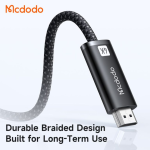
- Durable Braided Jacket: High-purity copper wiring encased in a wear-resistant, anti-tangle nylon braided exterior cable.
- Aluminum Alloy Shell: Lightweight yet sturdy metallic housing provides superior heat dissipation during extended streaming sessions.
- Broad Compatibility: Works seamlessly with USB-C laptops, tablets, and smartphones supporting DisplayPort Alt Mode connected to HDMI displays, TVs, and projectors.
🎁 Special Offers
🎉 First Order Discount — 5% OFF
প্রথমবার Gadget Beng থেকে অর্ডার করলে ৫% ডিসকাউন্ট।
Minimum order ৳1,500 · Maximum discount ৳150
🚚 Free Delivery
নির্দিষ্ট পরিমাণের বেশি অর্ডার করলেই ডেলিভারি চার্জ ফ্রি!
Minimum order ৳3,000 · Once per order · Nationwide delivery
Mcdodo CA-7900 USB-C to HDMI 4K 60Hz Cable – 2M
Upgrade your viewing and productivity experience with the Mcdodo CA-7900 Cab Flow USB-C to HDMI Cable. Designed to connect compatible USB-C devices directly to HDMI-enabled TVs, monitors, and projectors, this cable delivers up to 4K Ultra HD resolution at 60Hz. It is a practical solution for watching videos, sharing presentations, working with a larger display, and enjoying compatible high-resolution content.With a convenient 2-metre length, braided nylon cable construction, aluminium-alloy connector housings, and a built-in signal-processing chip, the CA-7900 combines everyday convenience with a durable design. Its plug-and-play operation means you can connect compatible devices without installing additional drivers.Key Features of Mcdodo CA-7900
1. 4K Ultra HD at 60Hz
Enjoy detailed visuals with support for resolutions up to 3840 × 2160 at 60Hz. Connect a compatible laptop, tablet, or smartphone to a 4K television or monitor for a larger and clearer viewing experience.2. USB-C to HDMI Connectivity
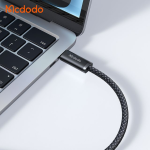
The direct USB-C-to-HDMI design connects a compatible USB-C source device to an HDMI display without requiring a separate video adapter. Please note that the connection works in one direction: USB-C to HDMI.3. Synchronized Audio and Video
Transmit supported video and digital audio together through the HDMI connection. This makes it convenient to watch movies, stream content, share presentations, and use a larger display without a separate audio cable.4. 10Gbps USB-C Interface
The listed USB-C 3.1 interface supports bandwidth of up to 10Gbps. Actual display performance depends on the capabilities of the connected source device, display, and supported video signal.5. Durable Braided Cable
The braided nylon exterior is designed to handle everyday handling and help resist tangling and surface wear. It is suitable for regular use at home, in the office, or while travelling.6. Aluminium-Alloy Connector Housings
The aluminium-alloy connector shells give the cable a premium finish and add structural support around the connection points.Enjoy a Bigger Screen with 4K 60Hz Output
A larger display can make entertainment, work, and presentations more convenient. The Mcdodo CA-7900 supports up to 4K resolution at 60Hz, allowing compatible USB-C devices to send high-resolution video to an HDMI-equipped screen.Connect your laptop to a 4K monitor for a more comfortable workspace, or link a compatible tablet or smartphone to a television to enjoy supported content on a bigger screen. The 60Hz refresh rate provides smooth everyday display performance when the source device and display both support the selected resolution and refresh rate.Wide Range of Practical Uses
For Office and Professional Work
Connect a compatible laptop to an external monitor or projector for meetings, presentations, spreadsheets, and multitasking. A larger display can make documents and workspaces easier to view.For Home Entertainment
Connect a supported USB-C device to an HDMI television or monitor to watch compatible video content on a bigger screen. Audio and video can travel through the same HDMI connection.For Online Classes and Presentations
Use the cable to display supported laptop or tablet content on a classroom screen, meeting-room monitor, or projector. Its 2-metre length provides some flexibility when arranging your devices.For a Multi-Display Workspace
Connect a compatible USB-C laptop to an external HDMI monitor. Depending on the operating system and device capabilities, you may be able to mirror your screen or extend your desktop.Important Compatibility Information
Not every USB-C port supports video output. Your source device must support DisplayPort Alt Mode video output over USB-C or a compatible Thunderbolt video connection. A USB-C charging or data port alone may not work with this cable.
- MacBook models with supported USB-C or Thunderbolt video output.
- USB-C laptops that support DisplayPort Alt Mode.
- Compatible iPad models with USB-C display output.
- Compatible Android smartphones with USB-C video output, including supported desktop-mode devices.
- Other USB-C or Thunderbolt devices with supported video output.
Simple Plug-and-Play Setup
- Check that your USB-C laptop, tablet, or smartphone supports video output.
- Connect the USB-C end of the Mcdodo CA-7900 to your source device.
- Connect the HDMI end to your television, monitor, or projector.
- Select the correct HDMI input on your display.
- Configure screen mirroring or extended display settings on your source device if required.
Technical Specifications
| Brand | Mcdodo |
| Model | CA-7900 |
| Series | Cab Flow |
| Product Type | USB-C to HDMI Display Cable |
| Input Connector | USB-C Male |
| Output Connector | HDMI Male |
| Connection Direction | USB-C to HDMI |
| Maximum Resolution | 4K UHD (3840 × 2160) |
| Refresh Rate | Up to 60Hz at supported 4K settings |
| USB-C Interface | USB-C 3.1 (listed) |
| Listed Bandwidth | Up to 10Gbps |
| Audio Transmission | Supported through HDMI |
| Cable Length | 2 Metres |
| Cable Material | Braided Nylon |
| Connector Housing | Aluminium Alloy |
| Signal Processing | Built-in intelligent chip |
| Installation | Plug and Play |
| Colour | Black |
Who Should Buy the Mcdodo CA-7900?
Students
Useful for connecting a compatible laptop or tablet to a classroom display or projector for lessons and presentations.Office Professionals
A practical cable for connecting supported laptops to external monitors and meeting-room displays.Home Entertainment Users
Suitable for viewing supported content from a compatible USB-C device on a larger HDMI television or monitor.Content Creators
Helpful for connecting compatible devices to an external display while reviewing projects and working with visual content.Frequently Asked Questions (FAQ)
1. Does the Mcdodo CA-7900 support 4K at 60Hz?
Yes. It supports up to 4K UHD resolution (3840 × 2160) at 60Hz when the connected source device and HDMI display support the required video output.
2. Will it work with every USB-C laptop or smartphone?
No. The USB-C port must support video output, typically through DisplayPort Alt Mode or a compatible Thunderbolt connection. Check your device specifications before purchasing.
3. Can I connect my laptop to a TV with this cable?
Yes, if your laptop supports USB-C video output and your TV has an HDMI input. Connect the USB-C end to the laptop and the HDMI end to the TV.
4. Does the cable transmit audio as well as video?
Yes. It supports synchronised audio and video transmission through the HDMI connection, provided the source device supports audio output over USB-C.
5. Is the Mcdodo CA-7900 a two-way cable?
No. It is designed for USB-C source devices to HDMI displays. It does not provide the reverse HDMI-to-USB-C connection.
6. How long is the Mcdodo CA-7900 cable?
The cable is 2 metres long, providing flexibility for desk setups, television connections, and meeting-room use.
7. Do I need to install any software or drivers?
The cable is designed for plug-and-play use and normally does not require additional driver installation. Your source device must still support USB-C video output.
8. Can I use it with an iPad or Android phone?
It may work with USB-C iPads and Android phones that support external video output. Compatibility varies by model, so check the manufacturer's specifications.
9. Can I use it to extend my laptop screen?
The cable can carry a display signal to an external monitor. Whether you can extend or mirror your screen depends on your laptop's operating system and graphics/display capabilities.
10. Is the Mcdodo CA-7900 suitable for a projector?
Yes, it can connect a compatible USB-C source device to a projector with an HDMI input. The projector and source device must support the intended resolution.
Connect to a Bigger Screen with Mcdodo CA-7900
Make your compatible USB-C laptop, tablet, or smartphone more versatile with the Mcdodo CA-7900 Cab Flow USB-C to HDMI Cable. With 4K 60Hz display support, synchronised audio and video, a durable braided exterior, and a convenient 2-metre length, it is a useful accessory for home, office, study, and entertainment setups.Choose Mcdodo CA-7900 for a simple USB-C-to-HDMI display connection.SMART GADGETS • TECHNOLOGY • ACCESSORIES
Discover practical technology and accessories for everyday life.
You May Also Like
More picks from this category


Reviews
Clear filtersThere are no reviews yet.