



Mcdodo OT-1580 Mini Bluetooth 5.1 Wireless Adapter
৳ 950 Original price was: ৳ 950.৳ 750Current price is: ৳ 750.
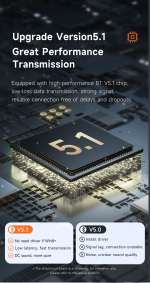
- Advanced Bluetooth 5.1: Ensures fast pairing, low latency, and energy-efficient wireless audio/data transmission.
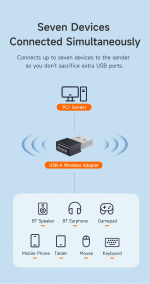
- Connects 7 Devices Simultaneously: Supports simultaneous pairing for headsets, speakers, mice, keyboards, and gamepads.
- 20-Meter Extended Range: Delivers a stable, barrier-free wireless connection up to 20 meters away.
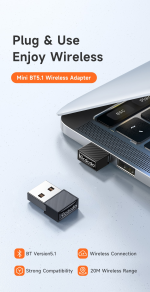
- Plug & Play Operation: Driver-free setup on Windows 8.1, 10, and 11 systems via standard USB-A.
- 3Mbps High-Speed Sync: Enables fast data transfer and smooth, lag-free stereo audio streaming.
- Ultra-Compact Nano Design: Pocket-sized 2g mini build fits flush in USB ports without blocking adjacent slots.
🎁 Special Offers
🚚 Free Delivery
৳2,000 টাকার বেশি অর্ডারে Free Delivery
💰 Shopping Bonus
৳5,000 টাকার বেশি অর্ডারে ৳300 ডিসকাউন্ট
Mcdodo OT-1580 Mini Bluetooth 5.1 Wireless Adapter
The Mcdodo OT-1580 Mini BT 5.1 Wireless Adapter is a compact USB Bluetooth dongle that helps add wireless connectivity to compatible desktop computers and laptops. If your PC does not have built-in Bluetooth, this tiny adapter provides a convenient way to connect supported wireless headphones, speakers, keyboards, mice, and game controllers.Featuring Bluetooth 5.1 technology, a listed wireless range of up to 20 metres in suitable conditions, and support for connecting multiple Bluetooth devices, the Mcdodo OT-1580 is designed for everyday computing, entertainment, and productivity. Its miniature size makes it easy to plug into a USB-A port without adding a bulky accessory to your setup.Why Choose the Mcdodo OT-1580 Bluetooth Adapter?
Connecting wireless accessories to a computer should be simple. The Mcdodo OT-1580 offers a practical option for users who want Bluetooth connectivity without installing a large internal card or replacing their existing computer.01. Bluetooth 5.1 Technology
Add Bluetooth connectivity to a compatible PC and connect supported wireless accessories for everyday use.
02. Up to 20m Range
The listed range reaches up to 20 metres under suitable conditions. Walls, interference, and obstacles may reduce the effective distance.
03. Multiple Device Support
Designed to support connections with up to seven Bluetooth devices, depending on the host system and the connected devices.
04. Compact Nano Design
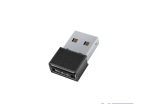
Its tiny 22 × 17 × 7.2 mm body takes up very little space and can remain connected to a suitable USB-A port.
05. Plug-and-Play Convenience
Compatible Windows 8 and later systems are generally listed as plug-and-play. Older systems may need a suitable driver.
06. Lightweight Construction
At approximately 2 grams, this small adapter is easy to carry and convenient for compact desktop or laptop setups.
Connect Your Favourite Bluetooth Accessories
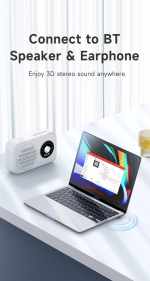
Wireless Headphones and Speakers
Pair compatible Bluetooth headphones or speakers with your computer for music, videos, online meetings, and other audio applications. Audio performance and latency depend on the connected devices, software, and Bluetooth configuration.Bluetooth Keyboard and Mouse
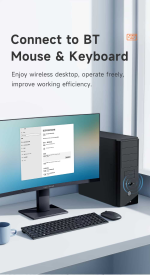
Create a cleaner workspace by connecting compatible wireless input devices. A Bluetooth keyboard and mouse can help reduce cable clutter around your desk and make everyday computer use more convenient.Game Controllers and Other Peripherals
The OT-1580 can also be used with supported Bluetooth game controllers and other compatible peripherals. Check the controller's operating-system support and game compatibility before purchasing the adapter for gaming.Compact Design for Everyday Computing
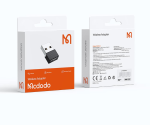
The Mcdodo OT-1580 features a small black body measuring approximately 22 × 17 × 7.2 mm. Its low-profile design is suitable for desktop computers, office workstations, and compatible laptops with a USB-A port.Because it weighs approximately 2 grams, it is easy to carry in a laptop bag or accessory pouch. The compact design is particularly useful when you want to add wireless connectivity without taking up the space required by a larger external adapter.Compatibility and Operating System Support
The Mcdodo OT-1580 is listed for use with compatible Windows and Linux systems. Published listings mention Windows 7, Windows 8.1, Windows 10, and Linux, although the exact driver and feature support can differ by operating-system version.- Connection: USB-A port on a compatible computer.
- Windows 8 and later: Commonly listed as plug-and-play; the actual setup may depend on the system and installed drivers.
- Older Windows versions: A compatible driver may be required.
- Linux: Compatibility depends on the distribution, kernel, and Bluetooth driver support.
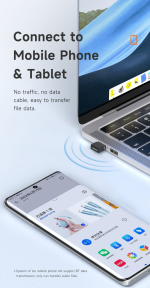
- Bluetooth accessories: Supports compatible headphones, speakers, keyboards, mice, controllers, and other peripherals.
The OT-1580 is a USB Bluetooth adapter for compatible host computers, not a Wi-Fi adapter. Before ordering, verify that your operating system supports the device and that the Bluetooth accessory you intend to use is compatible. The listed 20-metre range is a maximum under suitable conditions, not a guaranteed indoor range.
Mcdodo OT-1580 Technical Specifications
| Brand | Mcdodo |
|---|---|
| Model | OT-1580 |
| Product Type | Mini USB Bluetooth Adapter |
| Bluetooth Version | Bluetooth 5.1 |
| Interface | USB-A |
| Wireless Range | Up to 20 metres under suitable conditions |
| Device Support | Up to 7 Bluetooth devices, as listed |
| Listed Data Rate | Up to 3 Mbps |
| Material | ABS plastic, as listed by retailers |
| Dimensions | Approximately 22 × 17 × 7.2 mm |
| Weight | Approximately 2 g |
| Color | Black |
How to Set Up the Mcdodo OT-1580
- Check that your computer has an available USB-A port and a compatible operating system.
- Insert the Mcdodo OT-1580 adapter into the USB-A port.
- Allow the operating system to detect the adapter. If required, install a compatible driver from a trusted source.
- Turn on Bluetooth on your computer and put your headphones, speaker, keyboard, mouse, or controller into pairing mode.
- Open the computer's Bluetooth settings, find the accessory, and complete the pairing process.
- Test the connection. If the device does not appear, check the driver, pairing mode, and operating-system compatibility.
Who Should Buy This Bluetooth Adapter?
Desktop PC Users
A practical option for adding Bluetooth to a compatible desktop computer without built-in Bluetooth connectivity.
Students and Professionals
Connect supported wireless peripherals for a more convenient study, office, or work-from-home setup.
Music and Movie Lovers
Use compatible Bluetooth headphones or speakers with a computer for everyday entertainment and audio playback.
Wireless Gaming Setups
Connect supported Bluetooth controllers, subject to operating-system, controller, and game compatibility.
Frequently Asked Questions
1. What is the Mcdodo OT-1580?
2. Does it work with a desktop computer?
3. What Bluetooth version does it support?
4. What is its wireless range?
5. Can it connect to headphones and speakers?
6. How many Bluetooth devices can it support?
7. Do I need to install a driver?
8. Does it work with Linux?
9. Is the Mcdodo OT-1580 a Wi-Fi adapter?
10. Where can I buy the Mcdodo OT-1580 in Bangladesh?
Add Bluetooth to Your PC in a Compact Design
Connect compatible wireless headphones, speakers, keyboards, mice, and other peripherals with the Mcdodo OT-1580 Mini Bluetooth 5.1 Wireless Adapter. Its tiny form factor makes it a convenient connectivity upgrade for compatible desktop and laptop setups.Explore the Mcdodo OT-1580 at Gadget Beng and check the latest price and availability.
SMART GADGETS • TECHNOLOGY • ACCESSORIES
Discover practical tech accessories and connectivity solutions for everyday life.
You May Also Like
More picks from this category


Reviews
Clear filtersThere are no reviews yet.