


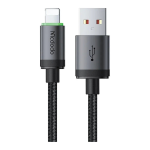
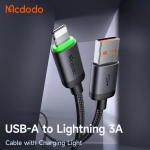
Mcdodo CA-2030 USB-A to Lightning 3A Charging Cable with LED Indicator
৳ 490
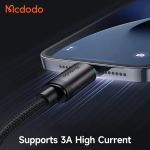
- 3A Fast Charging Output: Supports up to 3A current output for fast power delivery to compatible iPhones, iPads, and iPods.
- Smart IC Safety Protection: Integrated intelligent chip regulates voltage and current to prevent overcharging, overheating, and battery degradation.
- Durable Nylon Braided Exterior: Tightly woven nylon outer jacket provides superior resistance against pulling, twisting, and daily wear.
- Aluminum Alloy Shells: Premium metal connector housings ensure effective heat dissipation and long-lasting structural strength.
- Reinforced Strain Relief: Extended SR joint design withstands frequent bending at the connector ends without cracking or tearing.
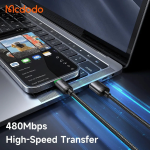
- 480Mbps Data Sync & Charging: Delivers simultaneous standard USB 2.0 file transfer and reliable power transmission.
🎁 Special Offers
🎉 First Order Discount — 5% OFF
প্রথমবার Gadget Beng থেকে অর্ডার করলে ৫% ডিসকাউন্ট।
Minimum order ৳1,500 · Maximum discount ৳150
🚚 Free Delivery
নির্দিষ্ট পরিমাণের বেশি অর্ডার করলেই ডেলিভারি চার্জ ফ্রি!
Minimum order ৳3,000 · Once per order · Nationwide delivery
Mcdodo Charging & Data Cable
Mcdodo CA-2030 USB-A to Lightning 3A Charging Cable with LED Indicator – 1M
The Mcdodo CA-2030 USB-A to Lightning Cable is a practical charging and data-sync solution for compatible Apple devices with a Lightning port. Featuring up to 3A maximum charging current, a built-in LED charging indicator and a durable braided exterior, this cable is suitable for everyday use at home, in the office or while travelling.Its USB-A connector makes it compatible with suitable USB-A wall chargers, power banks, computers and other USB-A power sources. The Lightning connector connects to supported iPhone and iPad models. With a convenient 1-metre length, the CA-2030 offers a useful balance between reach and cable management.Up to 3A
Maximum charging current
USB-A to Lightning
For compatible Apple devices
LED Indicator
Illuminated charging design
1 Metre
Convenient everyday length
Key Features of Mcdodo CA-2030
Up to 3A Charging Support
Designed to support a maximum charging current of 3A under compatible conditions. Pair it with a suitable USB-A charger and Lightning device to get the charging performance supported by your setup.LED Charging Indicator
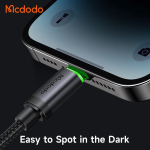
The built-in LED indicator adds a distinctive illuminated detail around the connector area and makes the cable easier to locate in dim surroundings.Charging and Data Sync
Use one cable for charging and supported data synchronisation. The USB 2.0 connection is listed with transfer speeds of up to 480Mbps.Braided Cable Exterior
The nylon-braided outer layer gives the cable a textured finish suited to regular handling, storage and everyday carrying.Aluminium-Alloy Connector Housing
Aluminium-alloy connector housings provide a solid outer finish around the connection points and complement the cable's practical design.Practical 1-Metre Length
The 1-metre cable length is convenient for desk setups, bedside charging, power banks and other situations where the power source is nearby.Up to 3A Charging for Compatible Lightning Devices
The Mcdodo CA-2030 supports up to 3A maximum charging current, making it a useful option for charging compatible Lightning-equipped Apple devices from a USB-A power source. It can be paired with a suitable USB-A wall adapter, power bank or computer port.Remember that the cable's maximum current rating does not mean every device will charge at 3A. Actual charging performance depends on the connected device, charger output, supported charging protocol and operating conditions. For the best result, use a reliable USB-A power adapter that is suitable for your device.LED Indicator for Convenient Use
The integrated LED charging indicator gives the Mcdodo CA-2030 a distinctive appearance compared with an ordinary unlit cable. It can also help you find the connector more easily when charging beside your bed or working in a low-light environment.This small design detail is useful for everyday charging setups where visibility and convenience matter. The LED is an indicator feature; it should not be confused with a digital display that shows charging wattage or battery percentage.Charging and Data Synchronisation
Beyond charging, the CA-2030 supports data synchronisation through its USB-A and Lightning connection. Its listed USB 2.0 data transfer rate is up to 480Mbps, allowing supported devices to connect with compatible computers and other data-capable USB-A equipment.Actual data functions depend on the connected device, computer, operating system and software. A USB port or adapter that provides power only will not necessarily support data synchronisation.Wired Apple CarPlay Support
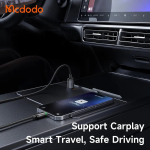
Bangladesh retailer listings identify the Mcdodo CA-2030 as supporting Apple CarPlay in compatible setups. This can make it useful for connecting a compatible Lightning-equipped iPhone to a vehicle that supports wired CarPlay through its USB-A port.CarPlay functionality depends on your iPhone, vehicle infotainment system and the vehicle's supported connection method. Check that your car supports wired CarPlay and that its USB port is intended for phone connectivity. A cable alone cannot add CarPlay support to a vehicle that does not have it.Durable Design for Everyday Charging
The CA-2030 combines a nylon-braided exterior with aluminium-alloy connector housings. This construction gives the cable a more substantial finish for daily use at home, in the workplace or on the move.For better long-term handling, avoid sharp bends near the connectors, keep the cable away from moisture and excessive heat, and unplug it by holding the connector rather than pulling on the wire.Compatible Devices and Connection Guide
This cable is designed for Apple devices that use a Lightning charging port. The USB-A end connects to a compatible USB-A power source, while the Lightning end connects to the Apple device.- Compatible: iPhone models with a Lightning port.
- Compatible: iPad models and other Apple accessories that use a Lightning port, subject to device support.
- Power sources: Suitable USB-A wall chargers, power banks, computers and compatible vehicle USB-A ports.
- Not suitable for direct connection: USB-C-only iPhones, iPads and Android devices.
Technical Specifications
| Brand | Mcdodo |
| Model | CA-2030 / CA2030 |
| Product Type | Charging and Data Cable |
| Connector A | USB-A Male |
| Connector B | Lightning Male |
| Maximum Current | Up to 3A |
| Data Transfer | Up to 480Mbps (USB 2.0) |
| Cable Length | 1 Metre |
| Indicator | LED Charging Indicator |
| Cable Material | Nylon Braided Exterior (retailer-listed) |
| Connector Housing | Aluminium Alloy (retailer-listed) |
| CarPlay | Listed for compatible wired CarPlay setups |
| Compatibility | Apple devices with a Lightning port |
| Colour | Black (confirm available stock) |
How to Use the Mcdodo CA-2030 Cable
- Connect the USB-A end to a compatible USB-A wall charger, power bank, computer or vehicle USB port.
- Connect the Lightning end to your compatible iPhone, iPad or other Lightning-equipped device.
- Use a suitable power adapter to get the charging performance supported by your device.
- For data synchronisation or wired CarPlay, connect to a compatible data-enabled USB-A port and follow the device or vehicle instructions.
- When disconnecting, hold the connector housing and remove it gently.
Who Should Buy the Mcdodo CA-2030?
Lightning iPhone Users
A practical cable for charging compatible iPhones from USB-A power sources.iPad Owners
A charging and data-sync option for supported Lightning-equipped iPad models.CarPlay Users
Worth considering for vehicles that support wired CarPlay through a compatible USB-A connection.Everyday Users
A useful spare or replacement cable for home, office, bedside and travel use.Frequently Asked Questions (FAQ)
1. What is the maximum charging current of the Mcdodo CA-2030?
The Mcdodo CA-2030 supports up to 3A maximum current. Actual charging performance depends on the charger and connected device.
2. What type of connectors does this cable have?
It has a USB-A male connector on one end and a Lightning male connector on the other.
3. Is the Mcdodo CA-2030 compatible with all iPhones?
It is designed for iPhone models with a Lightning port. USB-C iPhone models require a different cable.
4. Does the cable support data transfer?
Yes. It supports data synchronisation, with retailer-listed USB 2.0 transfer speeds of up to 480Mbps.
5. What is the purpose of the LED indicator?
The built-in LED provides an illuminated indicator around the cable connector, making it easier to locate in low-light conditions.
6. Can I use the CA-2030 with a USB-A power bank?
Yes. You can connect it to a compatible power bank with a USB-A output to charge a Lightning-equipped device.
7. Does the Mcdodo CA-2030 support Apple CarPlay?
Retailer listings identify CarPlay support. It can be used in compatible wired CarPlay setups, provided the iPhone and vehicle support the connection.
8. How long is the Mcdodo CA-2030 cable?
The listed cable length is 1 metre, making it suitable for many desk, bedside and travel charging setups.
9. Can I connect this cable directly to a USB-C charger?
No. The cable has a USB-A connector. A USB-C-only charger cannot accept it directly; you would need a suitable adapter or a USB-C-to-Lightning cable instead.
10. Is the CA-2030 suitable for Android phones?
Not directly. Its Lightning connector is designed for compatible Apple devices, not Android phones with USB-C or Micro-USB ports.
Get the Mcdodo CA-2030 USB-A to Lightning Cable
Need a practical Lightning cable for everyday charging and data synchronisation? The Mcdodo CA-2030 combines up to 3A charging support, an LED indicator and a braided design in a convenient 1-metre cable.Choose the Mcdodo CA-2030 for your compatible Lightning device and USB-A charging setup.GadgetBeng
SMART GADGETS • TECHNOLOGY • ACCESSORIES
You May Also Like
More picks from this category


Reviews
Clear filtersThere are no reviews yet.