


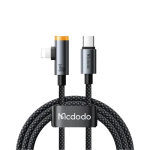
Mcdodo CA-5860 36W USB-C to Lightning Right-Angle Cable with Smart Auto Power-Off
৳ 890
- 36W Max PD Fast Charging: Delivers up to 36W (3A Max) high-speed power delivery to rapidly charge compatible iPhones and iPads.
- Ergonomic 90-Degree Right-Angle Design: Curved connector rests flush against your phone, reducing cord bending and providing an unhindered grip during mobile gaming.
- Smart Auto Power-Off: Intelligently cuts power once the battery reaches full charge to prevent overcharging and extend iPhone battery health.
- Smart LED Charging Indicator: Features a dual-color breathing LED light to indicate fast charging mode and full-charge power-off status.
- Integrated Safety Microchip: Automatically manages current flow and regulates temperature to prevent over-voltage and overheating.
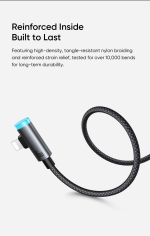
- Durable Nylon Braided Exterior: High-density woven cable paired with zinc-alloy shells for superior bend resistance and long-lasting durability.
🎁 Special Offers
🎉 First Order Discount — 5% OFF
প্রথমবার Gadget Beng থেকে অর্ডার করলে ৫% ডিসকাউন্ট।
Minimum order ৳1,500 · Maximum discount ৳150
🚚 Free Delivery
নির্দিষ্ট পরিমাণের বেশি অর্ডার করলেই ডেলিভারি চার্জ ফ্রি!
Minimum order ৳3,000 · Once per order · Nationwide delivery
MCDODO CAB SMART SERIES
Mcdodo CA-5860 36W USB-C to Lightning Right-Angle Cable with Smart Auto Power-Off
The Mcdodo CA-5860 36W USB-C to Lightning Right-Angle Cable is designed for Apple users who want convenient charging, comfortable device handling and intelligent charging management. Combining up to 36W Power Delivery charging with a 90-degree L-shaped Lightning connector, this cable makes it easier to use a compatible iPhone or iPad while connected to a charger.Its standout feature is the ergonomic right-angle connector, which directs the cable along the edge of your device rather than straight out from the port. This is particularly useful when playing mobile games, watching videos or holding your phone horizontally. The CA-5860 also features smart auto power-off functionality, a dual-colour LED indicator, USB 2.0 data transfer up to 480Mbps and a durable nylon-braided exterior with aluminium-alloy connector housings.36W
Maximum PD Charging
90°
Right-Angle Lightning Connector
480Mbps
USB 2.0 Data Transfer
1.2 Metres
Practical Cable Length
Key Features of Mcdodo CA-5860
1. Up to 36W PD Fast Charging
The cable supports up to 36W Power Delivery charging with a maximum current rating of 3A. Connect it to a compatible USB-C PD charger to charge supported Lightning-equipped Apple devices. Actual charging speed depends on the device and power adapter.2. Ergonomic 90° Right-Angle Connector
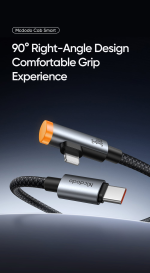
The L-shaped Lightning connector directs the cable along the side of your device. This can make it more comfortable to hold your phone while gaming, watching videos or browsing in landscape orientation.3. Smart Auto Power-Off
The built-in smart charging function is designed to stop charging current when the connected device reaches a full-charge condition. This helps reduce unnecessary charging after the battery is full. Follow the product manual for the exact cut-off and restart behaviour.4. Dual-Colour LED Indicator
The LED indicator provides a visual charging-status reference. Product listings describe orange for fast charging, ice blue for standard or trickle charging, and the light switching off when charging is complete.5. USB 2.0 Data Transfer
The CA-5860 supports data transfer up to 480Mbps for compatible Lightning devices. Use it for everyday syncing and file transfers alongside charging.6. Braided Nylon and Alloy Housing
The nylon-braided exterior and aluminium-alloy connector housings provide a practical construction for everyday use. The reinforced cable ends are designed to handle regular connection and movement.36W USB-C PD Fast Charging for Lightning Devices
The Mcdodo CA-5860 supports up to 36W Power Delivery charging at a maximum current of 3A. Its USB-C connector connects to a compatible PD wall charger, power bank or other USB-C power source, while the Lightning connector connects to your compatible Apple device.For fast charging, use a suitable USB-C PD adapter and a Lightning device that supports the relevant charging protocol. The cable's 36W rating is its maximum advertised capacity, not a guarantee that every iPhone or iPad will draw 36W. The connected device controls its own charging speed.90° Right-Angle Design for Comfortable Gaming
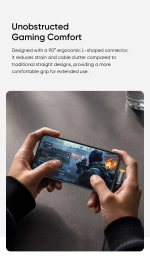
A conventional straight Lightning connector can protrude from the bottom of a phone and interfere with your hand when holding the device horizontally. The CA-5860 uses a 90-degree L-shaped connector that directs the cable alongside the device instead.This design is particularly useful in everyday situations such as:- Mobile gaming: Helps keep the cable away from your grip while playing in landscape mode.
- Watching videos: Makes it more convenient to hold your phone horizontally while charging.
- Browsing and reading: Offers a more comfortable cable position when using your device for extended periods.
- Everyday charging: Helps reduce awkward cable positioning around the connector area.
Smart Auto Power-Off Charging Technology
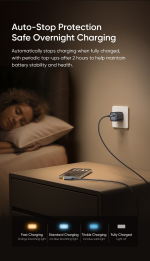
The Cab Smart charging function is designed to detect when the connected device reaches a full-charge condition and automatically stop the charging current under supported operating conditions. This can be convenient for people who regularly leave their iPhone or iPad connected to a charger for extended periods.Some product listings describe a later battery-level recheck, with one listing specifying a two-hour interval. The exact restart behaviour may depend on the cable's control logic and the connected device, so consult the supplied instructions for the confirmed operating cycle.Important: Auto power-off is a charging-management feature, not a guarantee against battery ageing or all forms of battery damage. Battery longevity also depends on temperature, charging habits and the device's own battery-management system.Dual-Colour LED Charging Indicator
The built-in LED indicator helps users identify the charging state at a glance. Product listings describe the following indicator behaviour:- Orange: Fast charging status.
- Ice blue: Standard or trickle charging status.
- Light off: Charging completed or smart power cut-off activated.
480Mbps Data Transfer and Syncing
The Mcdodo CA-5860 supports USB 2.0 data transfer at up to 480Mbps. In addition to charging, it can connect compatible Lightning devices to supported computers and other data sources for everyday syncing and file transfers.The 480Mbps figure is the maximum listed interface speed. Real-world transfer performance depends on the connected device, computer port, software and file type.Durable Braided Construction and 1.2-Metre Length
The CA-5860 combines a nylon-braided cable exterior with aluminium-alloy connector housings. This construction provides a practical finish for everyday charging and handling, while the reinforced connector areas are designed to withstand regular use.Its 1.2-metre length provides useful reach for bedside charging, desk setups and everyday use at home or in the office. The right-angle Lightning connector also helps keep the cable close to the edge of your device.Mcdodo CA-5860 Specifications
| Brand | Mcdodo |
| Series | Cab Smart |
| Model | CA-5860 |
| Product Type | USB-C to Lightning Charging and Data Cable |
| Connector Type | USB-C Male to Lightning Male |
| Connector Design | 90° Right-Angle Lightning Connector |
| Maximum Charging Power | 36W |
| Maximum Current | 3A |
| Charging Technology | USB Power Delivery (PD) |
| Smart Function | Smart Auto Power-Off |
| Data Transfer | Up to 480Mbps (USB 2.0) |
| LED Indicator | Dual-Colour Status Indicator |
| Cable Length | 1.2 Metres |
| Materials | Nylon Braided Cable and Aluminium-Alloy Connector Housings |
| Colour | Black |
Compatible Devices
The Mcdodo CA-5860 is intended for Apple devices with a Lightning charging port. Compatible device families may include:- Lightning-equipped iPhone models, including supported iPhone 8 to iPhone 14 series devices.
- Compatible iPad models with a Lightning connector.
- Lightning-equipped AirPods charging cases and other supported Apple accessories.
How to Use the Mcdodo CA-5860 Cable
- Connect the USB-C end to a compatible USB-C PD wall charger, power bank or other power source.
- Connect the right-angle Lightning end to your compatible Apple device.
- Allow the charger and device to negotiate the supported charging power.
- Check the LED indicator for the charging-status reference.
- Allow the smart auto power-off function to operate according to its supported conditions.
- When disconnecting, hold the connector housing instead of pulling the cable itself.
Who Should Buy the Mcdodo CA-5860?
Lightning iPhone Users
A practical charging cable for compatible Lightning iPhones when paired with a suitable USB-C PD charger.Mobile Gamers
The 90-degree connector helps keep the cable closer to the edge of your phone while playing in landscape mode.Overnight Charging Users
The smart auto power-off function is designed to stop charging when a full-charge condition is detected under supported operating conditions.Everyday Apple Device Users
A useful option for compatible Lightning iPhones, iPads and accessories that need USB-C PD charging and standard data syncing.Frequently Asked Questions (FAQ)
1. What is the maximum charging power of the Mcdodo CA-5860?
The CA-5860 supports up to 36W Power Delivery charging with a maximum current rating of 3A. Actual charging power depends on the charger and connected device.
2. Which devices are compatible with this cable?
It is designed for compatible Apple devices with a Lightning port, including supported iPhone, iPad and AirPods charging-case models.
3. What is the benefit of the 90-degree connector?
The L-shaped Lightning connector directs the cable along the side of your device, making it more convenient to hold your phone horizontally while gaming or watching videos.
4. What does Smart Auto Power-Off do?
It is designed to stop charging current when a full-charge condition is detected under supported operating conditions. Refer to the product manual for exact cut-off and restart behaviour.
5. Does the CA-5860 support iPhone fast charging?
Yes. It supports PD charging for compatible Lightning iPhones when paired with a suitable USB-C PD charger. The iPhone determines the charging speed it accepts.
6. What is the data transfer speed?
The listed maximum data transfer speed is 480Mbps through its USB 2.0 interface.
7. Can I use this cable with an iPhone 15 or newer?
No, not as a direct cable. iPhone 15 and newer models use USB-C ports, while the CA-5860 has a Lightning connector on the device end.
8. What do the LED indicator colours mean?
Listings describe orange for fast charging, ice blue for standard or trickle charging, and the light switching off when charging is complete. Check the included instructions for the exact status meanings.
9. How long is the Mcdodo CA-5860 cable?
The listed cable length is 1.2 metres, providing practical reach for home, office and everyday charging setups.
10. Does the cable include a USB-C charger?
The CA-5860 is a charging and data cable. A USB-C PD charger is required separately unless the seller explicitly states that one is included in the package.
Charge Comfortably with Smart Cable Technology
Choose the Mcdodo CA-5860 36W USB-C to Lightning Right-Angle Cable for compatible Apple device charging, comfortable 90-degree connectivity and smart auto power-off functionality. A practical cable for gaming, video streaming and everyday charging.
Shop Mcdodo CA-5860 at Gadget Beng
GadgetBeng
SMART GADGETS • TECHNOLOGY • ACCESSORIES
You May Also Like
More picks from this category


Reviews
Clear filtersThere are no reviews yet.